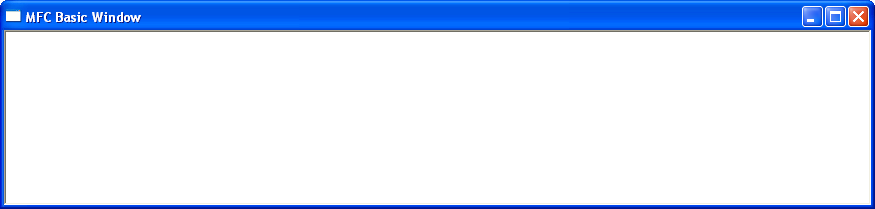
The example below demonstrates the smallest practical MFC application. It creates a standard frame window complete with a title bar, system menu, minimise, maximise and close buttons. The application consists of two classes: one derived from CWinApp to represent the application, and one derived from CFrameWnd to represent the main application window.
Only one virtual member function, InitInstance(), is overridden.
#include <afxwin.h>
class CSimpleApp : public CWinApp
{
public:
BOOL InitInstance();
};

class CMainFrame : public CFrameWnd
{
public:
CMainFrame();
};

CSimpleApp MFCApp1;

BOOL CSimpleApp::InitInstance()
{
m_pMainWnd = new CMainFrame();
m_pMainWnd->ShowWindow(m_nCmdShow);
return TRUE;
}

CMainFrame::CMainFrame()
{
Create(NULL, TEXT("MFC Basic Window"));
}
Line 1
#include <afxwin.h>
The header file afxwin.h contains the core MFC classes required by almost every MFC application. It provides declarations for classes such as CWinApp, CWnd, CFrameWnd, CString and many other fundamental MFC classes.
Lines 3–7
class CSimpleApp : public CWinApp
Every MFC application must derive a class from CWinApp. This class represents the application itself and is responsible for initialising the MFC framework, creating the application’s main window and controlling the application’s lifetime.
The InitInstance() member function is one of the most important virtual functions in CWinApp. It is called automatically when the application starts and should be overridden to perform any application-specific initialisation.
Returning TRUE indicates that initialisation completed successfully and the application should continue running. Returning FALSE causes the application to terminate immediately.
Lines 9–13
class CMainFrame : public CFrameWnd
The application’s main window is represented by a class derived from CFrameWnd.
CFrameWnd is itself derived from CWnd, the fundamental MFC window class that encapsulates a Windows window and its associated behaviour.
A frame window typically provides:
- A title bar.
- A system menu.
- Minimise, maximise and close buttons.
- A client area.
- Optional menus, toolbars and status bars.
Line 15
CSimpleApp theApp;
This statement creates the application’s single global CWinApp object.
Every MFC application must contain exactly one object derived from CWinApp. This object is created before the program begins executing and remains in existence until the application terminates.
Lines 17–24
The overridden InitInstance() function creates the application’s main window.
m_pMainWnd = new CMainFrame();
creates the main frame window dynamically and stores a pointer to it in the m_pMainWnd data member inherited from CWinApp.
The window is then displayed by calling
ShowWindow(m_nCmdShow);
The value of m_nCmdShow is supplied by Windows and specifies how the application should initially appear (for example, normal, minimised or maximised).
Finally,
UpdateWindow();
forces the window to repaint immediately if necessary.
Lines 26–29
The constructor of the CMainFrame class creates the window by calling the inherited Create() member function.
Create(NULL, TEXT("MFC Basic Window"));
The first parameter specifies the window class. Passing NULL causes MFC to register and use its default frame window class.
The second parameter specifies the text displayed in the window’s title bar.
If successful, Create() returns a non-zero value. If the window cannot be created, it returns zero.
Summary
Although extremely small, this application demonstrates the fundamental structure of every MFC program. The CWinApp-derived class initialises the application, while the CFrameWnd-derived class creates the application’s main window. Once InitInstance() returns TRUE, MFC enters its internal message loop and the application begins responding to user input.
Further information about the Create function can be found in the link below.
https://docs.microsoft.com/en-us/cpp/mfc/reference/cframewnd-class?view=vs-2019#create