Displaying Text
The two most commonly used functions for displaying text in an MFC application are the CDC member functions TextOut() and DrawText(). Both functions display text using the font currently selected into the device context. If no custom font has been selected, the system default font is used.
TextOut() is typically used to display a single line of text at a specified position, while DrawText() provides greater flexibility by allowing text to be aligned, wrapped, or formatted within a rectangular region.
The prototypes for these member functions are:
virtual BOOL TextOut(int x,int y,LPCTSTR lpszString,int nCount);
BOOL TextOut(int x,int y,const CString& str);
Where
x – Specifies the vertical position of the starting point of the text.
y – Specifies the horizontal position of the starting point of the text.
lpszString – Points to the character string to be drawn.
nCount – Specifies the number of characters in the string.
str – A CString object that contains the characters to be drawn.
Returns non-zero if the function is successful; otherwise zero.
virtual int DrawText(LPCTSTR lpszString,int nCount,LPRECT lpRect,UINT nFormat);
int DrawText(const CString& str, LPRECT lpRect,UINT nFormat);
where
pszString – Points to the string to be drawn.
nCount – Specifies the number of chars in the string.
lpRect – Points to a RECT structure or CRect object that contains the text to be formatted.
str – A CString object that contains the specified characters to be drawn.
nFormat – Specifies the method of formatting the text.
The function returns the height of the text if the function is successful.
Fonts
In MFC, the CFont class is used to create and manipulate fonts. By default, the CDC text output class can draw text using a pre-selected system. MFC supports 7 built-in fonts. These are
ANSI_FIXED_FONT
ANSI_VAR_FONT
DEVICE_DEFAULT_FONT
DEFAULT_GUI FONT
OEM_FIXED_FONT
SYSTEM_FONT
SYSTEM_FIXED_FONT
To select one of these stock fonts into the current device context first create a CFont object and then call the object member function CreateStockObject() using one of the custom font names above. The CFont object can then be selected into the current device context by calling the SelectObject() member function as below –
CFont newfont;
Newfont.CreateStockObject(ANSI_FIXED_FONT);
paintDC.SelectObject(newfont);
Custom Fonts
The CFont object class supplies 4 member functions for creating and initialising a font before use: CreateFont(), CreateFontIndirect(), CreatePointFont(), and CreatePointFontIndirect(). Use CreateFont or CreateFontIndirect to specify the font size in pixels, and CreatePointFont and CreatePointFontIndirect to specify the font size in points. The syntax for the CreateFont member function is
BOOL CreateFont( int nHeight, int nWidth,int nEscapement, int nOrientation,int nWeight,BYTE bItalic, BYTE bUnderline,BYTE bStrikeOut,BYTE nCharSet,BYTE nOutPrecision,BYTE nClipPrecision, BYTE nQuality,BYTE nPitchAndFamily, LPCTSTR lpszFacename);
where
nHeight – The height, in logical units, of the font.
nWidth – The average, in logical units, of the font.
nEscapement – Angle of the escapement.
nOrientation – Base-line orientation angle
nWeight – Font weight ( 0 – 1000)
bItalic – Specifies an italic font.
bUnderline – Specifies an underlined font.
bStrikeOut – A strikeout font if set to TRUE.
nCharSet – Character set identifier
nOutPrecision – Defines how closely the output must match the requested font attributes
nClipPrecision – Defines how to clip characters partially outside the clipping region.
nQuality – Defines how carefully GDI must attempt to match the logical font attributes to those of an actual physical font.
nPitchAndFamily -The two low-order bits specify the pitch of the font
pszFaceName – Is a pointer to a null-terminated string that specifies the typeface name of the font
If the function succeeds, the return value is a handle to a logical font. If the function fails, the return value is NULL.
For further detailed reading of the CreateFont member function
https://docs.microsoft.com/en-us/cpp/mfc/reference/cfont-class?view=vs-2019#createfont
For further detailed reading on the CFont MFC class
https://docs.microsoft.com/en-us/cpp/mfc/reference/cfont-class?view=vs-2019
Deleting GDI Objects
CFont objects, like other objects derived from GDI object classes, use system resources and consume memory. These resources should be released when they are no longer needed to prevent memory leaks.
If a CFont object is created as a local stack object, it is automatically destroyed when it goes out of scope. The destructor of the object releases the associated GDI resources.
If a CFont object is created dynamically on the heap using new, it must be explicitly released. The program should call DeleteObject() before deleting the object.
Setting Text Colour.
The cdc member function SetTextColor() sets the text colour to the specified colour. The syntax for this function is –
settextcolor(colorref color);
Where color specifies the colour of the text as an RGB colour value.
Returns an RGB value for the previous text colour.
Setting the Text Background Colour
The cdc member function SetTextColor sets the text background to the specified colour. The syntax for this function is
virtual COLORREF SetBkColor(COLORREF colour);
Where colour specifies the new background colour.
Returns the previous background colour as an RGB colour value. If an error occurs, the return value is 0x80000000.
Setting the Text Background Display Mode
The background mode defines whether the system removes existing background colours before drawing text. To set the way text is displayed against its background use the cdc function SetBkMode(). The device context text background can be set to opaque or transparent. The prototype for this function is
SetBkMode(int nBkMode)
where
nBKMode – Specifies the mode to be set. This parameter can be either of the following values:
- opaque – Background is filled with the current background colour before the text, hatched brush, or pen is drawn. This is the default background mode.
- transparent – Background is not changed before drawing.
Returns the previous background mode.
Textmetric
When an application displays multiple lines of text, it must know the amount of horizontal space occupied by each line so that subsequent text can be positioned correctly. Windows does not automatically maintain a record of the current text output position, so the application must calculate the size of the text itself.
This is particularly important when using proportional fonts (non-monospaced typefaces), where each character can have a different width. For example, the letter “i” takes less horizontal space than the letter “W”, meaning the length of a string cannot be calculated simply by counting characters.
MFC provides the CDC member function GetTextExtent() to determine the size of a text string using the currently selected font in the device context.
BOOL GetTextMetrics(LPTEXTMETRIC lpMetrics) const;
Where lpMetrics points to the TEXTMETRIC structure that receives the metrics.
For detailed reading on the textmetric structure use the following resource
https://docs.microsoft.com/en-us/windows/win32/api/wingdi/ns-wingdi-textmetricw
Character Spacing
When an application displays consecutive lines of text, it needs to know the length of each string so that the next line can be positioned correctly. This is necessary because Windows does not automatically keep track of the current text output position.
The amount of horizontal space occupied by a string depends on the font being used. In a monospaced font, every character has the same width, making spacing predictable. However, in a non-monospaced (proportional) font, characters have different widths, so the length of a string cannot be determined simply by counting characters.
To solve this problem, MFC provides the CDC member function GetTextExtent(). This function calculates the size of a text string using the font currently selected into the device context.
The syntax of this function is
CSize GetTextEntent( LPCTSTR lpszString, int nCount ) const;
CSize GetTextExtent( const CString& str ) const;
Where
lpszString – Points to a string of characters.
nCount – Specifies the number of characters in the string.
str – A CString object that contains the specified characters.
Returns the dimensions of the string in a CSize object.
Example
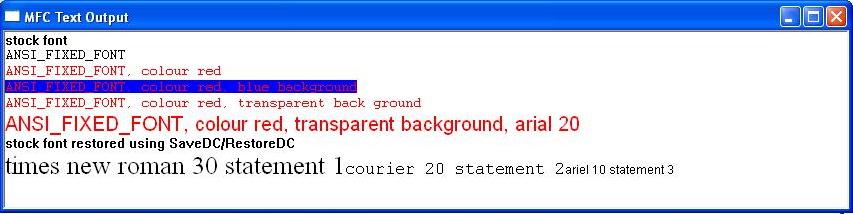
The following short program demonstrates the various text manipulation functions.