The MFC Document/View Architecture is a framework designed to separate the storage and management of application data from its presentation. This is achieved by encapsulating the application data within a document class and the presentation of that data within one or more view classes. Separating the data from its presentation makes applications easier to maintain and extend, particularly when multiple views display the same underlying document.
MFC supports two types of document/view applications: Single Document Interface (SDI) and Multiple Document Interface (MDI) applications.
Single Document Interface
A Single Document Interface (SDI) application displays only one document at a time. Each application window contains a single document and its associated view. To work with multiple documents simultaneously, the user must open multiple instances of the application.
Microsoft Notepad is a classic example of an SDI application.
A typical SDI application consists of four principal classes.
CDocument
The CDocument class provides the functionality required to manage an application’s data. This includes creating new documents, loading existing documents, saving documents, tracking modifications, and supporting printing.
One of the most important responsibilities of the document class is serialization. Serialization is the process of storing an object’s data to a file or restoring it from a file. MFC performs serialization through the CArchive class, allowing applications to read and write object data without performing low-level file operations manually.
CView
The CView class is responsible for displaying the contents of the document and processing user interaction. A view renders the document on the screen or printer while responding to keyboard and mouse input.
MFC supplies several specialised view classes derived from CView, including CEditView, CListView, CTreeView, CFormView, and CRichEditView, each designed for a particular style of presentation.
CMainFrame
The CMainFrame class encapsulates the application’s main frame window. In an SDI application, the view occupies the client area of the main frame window and is created automatically by the document template.
CWinApp
The CWinApp class is the base class from which every MFC application derives its application object. It is responsible for initialising the application, creating the document template, processing the message loop, and managing the application’s lifetime.
Dynamic Creation
Unlike ordinary C++ objects, document, view, and frame objects are created dynamically at run time by the MFC framework. To support this mechanism, MFC uses two macros.
DECLARE_DYNCREATE(ClassName)
Placed in the class declaration.
IMPLEMENT_DYNCREATE(ClassName, BaseClass)
Placed in the implementation (.cpp) file.
These macros enable MFC to create objects using runtime class information rather than explicit constructor calls.
Note:
IMPLEMENT_DYNCREATE()belongs in the implementation file, not inside the class declaration.
Document Templates
An SDI application associates its document, frame, and view classes using a document template. MFC provides the CSingleDocTemplate class for this purpose.
CSingleDocTemplate(
    UINT nIDResource,
    CRuntimeClass* pDocClass,
    CRuntimeClass* pFrameClass,
    CRuntimeClass* pViewClass
);
Where
- nIDResource specifies the resource identifier associated with the document type.
- pDocClass points to the document class (
CDocumentderived). - pFrameClass points to the frame window class (
CFrameWndderived). - pViewClass points to the view class (
CViewderived).
Once created, the template is registered with the application using the AddDocTemplate() member function.
Command Line Processing
When an MFC application starts, it creates a CCommandLineInfo object to store command-line information. The ParseCommandLine() member function interprets the command line and determines whether the application should create a new document, open an existing document, or perform another action.
The resulting command information is then processed by calling ProcessShellCommand().
Saving and Loading Documents
The Serialize() member function, declared in the CObject class and overridden in CDocument, is responsible for saving and loading document data.
The function receives a CArchive object that manages the transfer of data between memory and a file.
When storing data, the application writes information using the insertion operator (<<).
When loading data, the application reads information using the extraction operator (>>).
Whether the archive is storing or loading data is determined by calling the IsStoring() member function.
A typical implementation is shown below.
void CMyDocument::Serialize(CArchive& ar)
{
    if (ar.IsStoring())
    {
        ar << m_Name;
        ar << m_Age;
    }
    else
    {
        ar >> m_Name;
        ar >> m_Age;
    }
}
he insertion operator (<<) or extracts data with the extraction operator (>>).
Example
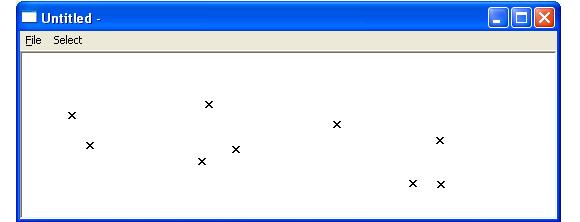
In the following example, an SDI application is created which places a sequence of markers at the position of the mouse click. Selecting the relevant display option will change the display marker from x to asterisk and vice versa while the various file/save, file/load and /file/recent demonstrate how to save and load data using the serialize function