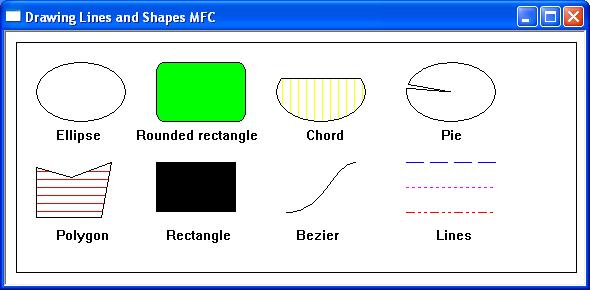
The CDC class provides the member functions used to perform graphics output in an MFC application. It specifies a Windows device context (DC) and provides functions for drawing lines, shapes, text, and images. This section introduces some of the most commonly used drawing functions. For a complete description of the CDC class, refer to the Microsoft documentation.
For a complete description of the CDC class, refer to the Microsoft MFC documentation.
A sample of the graphics object functions found in the CDC class is listed below
Displaying Pixels
Single pixels can be drawn on the screen using the member function SetPixel() –
COLORREF SetPixel(int x,int y,COLORREF pColour);
COLORREF SetPixel(POINT point,COLORREF pColor);
Where
x – Specifies the logical x-coordinate.
y – Specifies the logical y-coordinate.
pColor – specifies the colour used to paint the point.
point – specifies a single (x,y) coordinate.
Returns an RGB value for the colour that is actually painted. This value may be different from pColor if an approximation is used. If the function fails, the return value is -1.
MoveTo
The initial starting position for graphics output will be the screen coordinate position 0,0; however, this can be set by the application with a call to the member function MoveTo(). The prototype for the Moveto function is –
CPoint MoveTo(int x,int y);
CPoint MoveTo(POINT point);
where
x – specifies the x-coordinate of the new position, in logical units.
y – specifies the y-coordinate of the new position, in logical units.
point – specifies the new position using either a point structure or a CPoint object.
Drawing Lines
LineTo draws a line from the current position to a specified position and moves the current position to the end of the line –
BOOL LineTo(int x, int y);
BOOL LineTo(POINT point);
where
x – Specifies the logical x-coordinate of the new position.
y – Specifies the logical y-coordinate of the new position.
point – specifies a single (x,y) coordinate.
Returns non-zero if the function succeeds; otherwise 0.
PolylineTo
Connects a set of points with line segments
BOOL PolylineTo(const POINT* lpPoints,int nCount);
where
lpPoints – Points to an array of POINT data structures that contains the vertices of the line.
nCount – Specifies the number of points in the array.
Returns nonzero if the function is successful; otherwise 0.
Ellipse
The Ellipse member function draws an ellipse that fits within the specified bounding rectangle. If the bounding rectangle is square, the result is a circle.
BOOL Ellipse( int x1, int y1,int x2,int y2);
BOOL Ellipse(LPCRECT lpRect);
Where
x1 – Specifies the x-coordinate of the upper-left corner of the ellipse’s bounding rectangle.
y1 – Specifies the y-coordinate of the upper-left corner of the ellipse’s bounding rectangle.
x2 – Specifies the x-coordinate of the lower-right corner of the ellipse’s bounding rectangle.
y2 – Specifies the y-coordinate of the lower-right corner of the ellipse’s bounding rectangle.
lpRect – Specifies the ellipse’s bounding rectangle.
Returns non-zero if the function is successful; otherwise 0.
Chord
A chord is the region bounded by an elliptical arc and the straight line joining the arc’s start and end points. The Chord member function draws a line segment connecting two points on a curve
BOOL Chord( int x1,int y1,int x2,int y2,int x3, int y3, int x4,int y4);
BOOL Chord(LPCRECT lpRect,POINT ptStart,POINT ptEnd);
where
x1 – Specifies the x-coordinate of the upper-left corner of the chord’s bounding rectangle.
y1 – Specifies the y-coordinate of the upper-left corner of the chord’s bounding rectangle.
x2 – Specifies the x-coordinate of the lower-right corner of the chord’s bounding rectangle.
y2 – Specifies the y-coordinate of the lower-right corner of the chord’s bounding rectangle.
x3 – Specifies the x-coordinate of the point that defines the chord’s starting point.
y3 – Specifies the y-coordinate of the point that defines the chord’s starting point.
x4 – Specifies the x-coordinate of the point that defines the chord’s endpoint.
y4 – Specifies the y-coordinate of the point that defines the chord’s endpoint.
lpRect – Specifies the bounding rectangle (in logical units).
ptStart – Specifies the x- and y-coordinates of the point that defines the chord’s starting point. This point does not have to lie exactly on the chord. .
ptEnd – Specifies the x- and y-coordinates of the point that defines the chord’s ending point (in logical units). This point does not have to lie exactly on the chord.
Returns non-zero if the function is successful; otherwise 0.
Pie
A pie is the region bounded by an elliptical arc and two lines extending from the centre of the ellipse to the arc’s start and end points. The Pie member function draws a pie-shaped wedge by drawing an elliptical arc whose center and two endpoints are joined by lines.
BOOL Pie( int x1, int y1,int x2, int y2,int x3, int y3,int x4, int y4);
BOOL Pie(LPCRECT lpRect,POINT ptStart,POINT ptEnd);
Where
x1 Specifies the x-coordinate of the upper-left corner of the bounding rectangle.
y1 Specifies the y-coordinate of the upper-left corner of the bounding rectangle.
x2 Specifies the x-coordinate of the lower-right corner of the bounding rectangle.
y2 Specifies the y-coordinate of the lower-right corner of the bounding rectangle.
x3 Specifies the x-coordinate of the arc’s starting point.
y3 Specifies the y-coordinate of the arc’s starting point.
x4 Specifies the x-coordinate of the arc’s endpoint (in logical units). This point does not have to lie exactly on the arc.
y4 Specifies the y-coordinate of the arc’s endpoint.
lpRect Specifies the bounding rectangle.
ptStart Specifies the starting point of the arc.
ptEnd Specifies the endpoint of the arc.
Returns non-zero if the function is successful; otherwise 0.
Polygon
The Polygon member function connects a sequence of points to form a closed polygon.
BOOL Polygon(LPPOINT lpPoints, int nCount);
Where
lpPoints – Points to an array of points that specifies the vertices of the polygon. Each point in the array is a POINT structure or a CPoint object.
nCount – Specifies the number of vertices in the array.
Returns non-zero if the function is successful; otherwise 0.
Rectangle
Draws a rectangle.
BOOL Rectangle(int x1,int y1,int x2,int y2);
BOOL Rectangle(LPCRECT lpRect);
where
x1 Specifies the x-coordinate of the upper-left corner of the rectangle.
y1 Specifies the y-coordinate of the upper-left corner of the rectangle.
x2 Specifies the x-coordinate of the lower-right corner of the rectangle.
y2 Specifies the y-coordinate of the lower-right corner of the rectangle.
lpRect Specifies the rectangle in logical units. You can either pass a CRect object or a pointer to a RECT structure for this parameter.
Returns non-zero if the function is successful; otherwise 0.
RoundRect
The member function RoundRect draws a rectangle with rounded corners
BOOL RoundRect( int x1, int y1,int x2,int y2, int x3,int y3);
BOOL RoundRect(LPCRECT lpRect, POINT point);
where
x1 Specifies the x-coordinate of the upper-left corner of the rectangle.
y1 Specifies the y-coordinate of the upper-left corner of the rectangle.
x2 Specifies the x-coordinate of the lower-right corner of the rectangle.
y2 Specifies the y-coordinate of the lower-right corner of the rectangle.
x3 Specifies the width of the ellipse used to draw the rounded corners.
y3 Specifies the height of the ellipse used to draw the rounded corners.
lpRect Specifies the bounding rectangle in logical units. You can either pass a CRect object or a pointer to a RECT structure for this parameter.
point – The x-coordinate of a point specifies the width of the ellipse to draw the rounded corners. The y-coordinate of a point specifies the height of the ellipse to draw the rounded corners. You can pass either a POINT structure or a CPoint object for this parameter.
Returns nonzero if the function is successful; otherwise 0.
Polyline
The Polyline member function draws a sequence of connected line segments.
BOOL Polyline(const POINT* lpPoints, int nCount);
Where
- lpPoints – Points to an array of
POINTstructures orCPointobjects defining the vertices. - nCount – Specifies the number of points in the array.
Returns non-zero if the function is successful; otherwise 0.
Unlike Polygon(), Polyline() does not close the figure by joining the last point to the first.
FillSolidRect
The FillSolidRect member function fills a rectangle using a solid colour.
void FillSolidRect(int x,int y,int cx,int cy,COLORREF clr);
void FillSolidRect(LPCRECT lpRect,COLORREF clr);
Where
- x – Specifies the x-coordinate of the upper-left corner.
- y – Specifies the y-coordinate of the upper-left corner.
- cx – Specifies the width of the rectangle.
- cy – Specifies the height of the rectangle.
- lpRect – Specifies the rectangle to fill.
- clr – Specifies the fill colour.
This function is commonly used for painting backgrounds and coloured panels.
FillRect
The FillRect member function fills a rectangle using the currently selected brush.
Bint FillRect(LPCRECT lpRect,CBrush* pBrush);
Where
- lpRect – Specifies the rectangle to fill.
- pBrush – Points to the brush used to paint the rectangle.
Returns a non-zero value if the function is successful; otherwise 0.
DrawFocusRect
The DrawFocusRect member function draws a focus rectangle using an XOR operation.
void DrawFocusRect(LPCRECT lpRect);
Where
- lpRect – Specifies the rectangle to draw.
Calling DrawFocusRect() a second time with the same rectangle removes it. This function is commonly used to indicate keyboard focus or to implement drag-selection rectangles.
InvertRect
The InvertRect member function inverts the colours within a rectangle.
void InvertRect(LPCRECT lpRect);
Where
- lpRect – Specifies the rectangle whose colours are to be inverted.
InvertRect() is often used to highlight a selected area without changing the underlying image.
FloodFill
The FloodFill member function fills an enclosed area beginning at a specified point.
BOOL FloodFill(int x,int y,COLORREF clr);
Where
- x – Specifies the x-coordinate of the starting point.
- y – Specifies the y-coordinate of the starting point.
- clr – Specifies the boundary colour.
Returns non-zero if the function is successful; otherwise 0.
ExtFloodFill
The ExtFloodFill member function fills an enclosed area using either a boundary colour or a surface colour.
BOOL ExtFloodFill(int x,int y,COLORREF clr,UINT nFillType);
Where
- x – Specifies the x-coordinate of the starting point.
- y – Specifies the y-coordinate of the starting point.
- clr – Specifies either the boundary colour or the colour to replace.
- nFillType – Specifies the fill mode (
FLOODFILLBORDERorFLOODFILLSURFACE).
Returns non-zero if the function is successful; otherwise 0.
For full details of Windows drawing capabilities use the following
https://docs.microsoft.com/en-us/cpp/mfc/reference/cdc-class?view=vs-2019
Example
The following short program illustrates some of the windows line and shape drawing capabilities