Common dialog boxes are a collection of predefined dialog boxes supplied by Windows for performing frequently used tasks such as opening and saving files, selecting fonts and colours, printing documents, and configuring page settings. Using these standard dialogs gives applications a consistent appearance and behaviour while reducing the amount of code the developer needs to write.
All MFC common dialog classes are derived from the CCommonDialog base class. Each derived class encapsulates one of the standard Windows common dialog boxes and provides member functions and constructors for configuring and displaying the dialog.
The appearance and behaviour of a common dialog box can be customised by supplying parameters to the class constructor or by setting one or more option flags before the dialog is displayed.
In MFC applications, the common dialog classes are declared in the afxdlgs.h header file, which is normally included automatically through afxwin.h.
The principal MFC common dialog classes are listed below.
| Class | Purpose |
|---|---|
| CColorDialog | Allows the user to select or create a color |
| CFileDialog | Allows the user to open or save a file |
| CFindReplaceDialog | Allows the user to substitute one string for another |
| CFontDialog | Allows the user to select a font from a list of available fonts |
| COleDialog | Useful for inserting OLE objects |
| CPageSetupDialog | Allows the user to set page measurement parameters |
| CPrintDialog | Allows the user to set up the printer and print a document |
| CPrintDialogEx | Printing and Print Preview for Windows 2000 |
For further detailed reading
https://docs.microsoft.com/en-us/cpp/mfc/reference/ccommondialog-class?view=vs-2019
Example
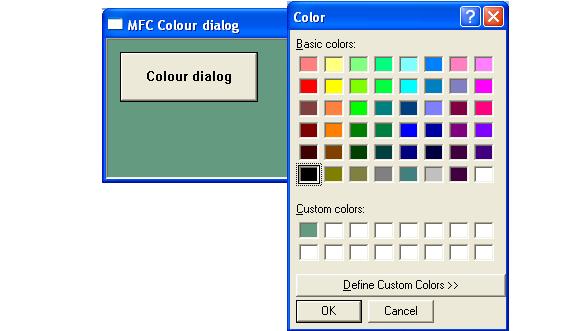
The following short program illustrates the use of the CColourDialog by changing the background colour of the windows to match that selected from the colour dialog box