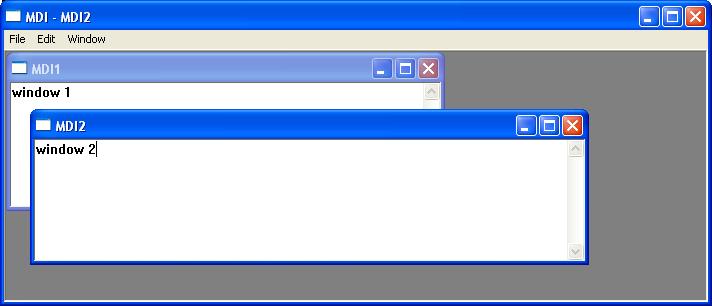
A Multiple Document Interface (MDI) application enables the user to work with several documents simultaneously within a single application window. Each document is displayed in its own MDI child window, which occupies the client area of the main application frame. Unlike separate top-level windows, all child windows are contained within the application’s main frame and can be arranged by cascading, tiling, or minimising them.
An MDI child window closely resembles a normal frame window, except that it exists within an MDI frame window rather than as an independent top-level window. Child windows do not possess their own menu bars. Instead, the active child window shares the menu and toolbar of the MDI frame. The MFC framework automatically updates the menu and other user interface elements to reflect the currently active document.
Like an SDI application, an MDI application contains document, view, frame, and application classes. However, an MDI application also requires a class derived from CMDIChildWnd, which encapsulates the behaviour of an individual MDI child window. Each child window hosts a single document and its associated view.
In addition to the resources associated with the main frame window, each document type normally has its own menu, accelerator table, and document template resources. These resources are automatically loaded whenever the corresponding document becomes active.
Document Templates
Unlike an SDI application, which uses a single CSingleDocTemplate, an MDI application uses one or more CMultiDocTemplate objects. Each document template associates a document class, view class, and child frame class with the resources required to create that document type.
The constructor for CMultiDocTemplate is:
CMultiDocTemplate(
    UINT nIDResource,
    CRuntimeClass* pDocClass,
    CRuntimeClass* pFrameClass,
    CRuntimeClass* pViewClass
);
Where:
- nIDResource specifies the resource identifier associated with the document type.
- pDocClass points to the document class derived from
CDocument. - pFrameClass points to the child frame class derived from
CMDIChildWnd. - pViewClass points to the view class derived from
CView.
Working with Multiple Document Types
An MDI application may support several different document types. Each document type requires its own:
- Document class
- View class
- Child frame class (optional but commonly used)
- Resource identifier
CMultiDocTemplate
Each document template is created during the application’s InitInstance() function and registered with the framework by calling AddDocTemplate().
For example:
CMultiDocTemplate* pDocTemplate;
PDocTemplate = new CMultiDocTemplate(IDR_SAMPLE1,
RUNTIME_CLASS(CSample1Doc),
RUNTIME_CLASS(CMDIChildWnd),
RUNTIME_CLASS(CSample1View));
AddDocTemplate(pDocTemplate);

pDocTemplate = new CMultiDocTemplate(
IDR_SAMPL2,
RUNTIME_CLASS(CSample2Doc),
RUNTIME_CLASS(CMDIChildWnd),
RUNTIME_CLASS(CSample2View));
AddDocTemplate(pDocTemplate);
Once the templates have been registered, the user can create each document type through the application’s File menu. The MFC framework automatically creates the appropriate document, child frame, and view objects based on the selected document template.
Example
The application below allows the user to create a multi-document interface based on the CeditView view class